
For marketers, designers & photo workflows
AI Layout-Style Edit – Free Tool
Author: FreeMake.cc Imaging TeamLast updated:
Base + reference images for compliant layout/style edits — no face or brand mark replacement
- Layout mimic: align image 1 composition and mood toward image 2
- Prop swap: replace only generic, non-branded objects
- Every Apimart call includes mandatory safety policy
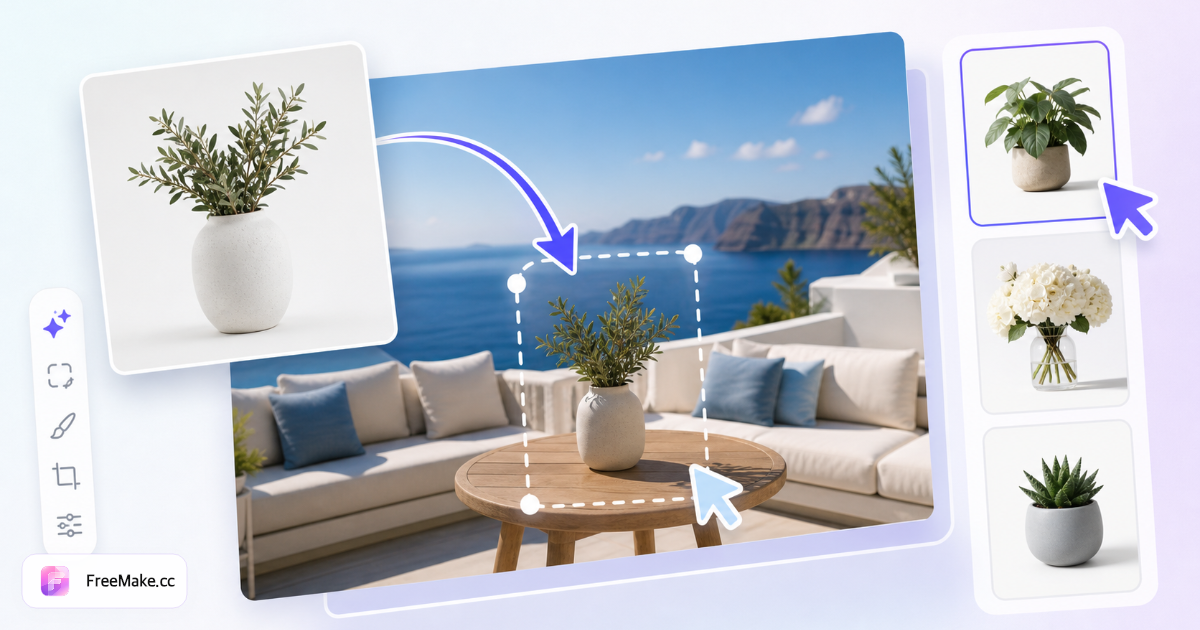
How to Replace Elements in Images with AI
Refresh product scene mocks by swapping props, backgrounds, or layout elements—not faces or logos. FreeMake.cc image-element-edit uses GPT Image 2 dual-image AI editing; shares daily free credits with homepage generation. Upload required for cloud processing.
Upload base image and reference
Provide the product photo to edit plus a reference showing desired background or prop style. Clear product edges and consistent lighting improve AI adherence.
Describe the element to replace
Prompt which objects or scenery to change while keeping identity and brand marks intact per tool policy. Avoid face swap requests—use passport or photo studio tools for portraits.
Generate and review AI output
Preview realism on shadows and contact points—floating products break shopper trust. Regenerate within daily quota if props clip through surfaces.
Export for detail pages or ads
Download results, then compress and resize for channel specs. Pair with product-detail generator when you need a full six-shot detail set from one SKU.
Why AI Element Edit Helps E-commerce Creative
Reshooting lifestyle scenes for every seasonal palette is expensive. Targeted AI edits update backgrounds and staging while preserving the hero product pixels sellers already approved.
Seasonal campaigns without reshoots
Swap summer patio for holiday interior on the same bottle shot—faster than location photography for mid-tier catalog breadth.
Localized props for regional ads
Adapt Western kitchen scenes for APAC markets by replacing utensils and décor while keeping packaging legible.
Policy-safe editing scope
Tool blocks face and logo replacement—reduces misuse risk while focusing on legitimate merchandising compositing.
FreeMake.cc vs Canva Magic Edit, Photoroom & Adobe Firefly
Canva and Firefly offer generative fills inside broader suites. FreeMake.cc image-element-edit is dual-image GPT Image 2 flow with seller quotas and product-detail toolchain links.
| Feature | FreeMake.cc | Canva | Adobe Firefly |
|---|---|---|---|
| Dual-image element swap | GPT Image 2 | Magic Edit | Generative fill |
| No face/logo swap policy | Enforced | Varies | Varies |
| Free daily AI | Shared credit pool | Pro limits | Credits |
| Upload required | Yes | Yes | Yes |
| E-commerce detail toolchain | Product detail gen | Templates | Creative Cloud |
AI Edit Inputs and Outputs
Accepts JPG/PNG product photos as base and reference. Output JPG suitable for detail modules and social—run white-background separately for Amazon heroes.
Shares daily free credits with homepage generation and other AI tools—resets at midnight Beijing time. Not a replacement for full CGI—use for plausible scene refreshes, not legal packaging text changes.
- JPG/PNG input — clear product photography
- Reference image — style guide for new background/props
- Shared daily free credits — same pool as homepage
- No face/logo swap — merchandising edits only
Layout-style edit FAQ
- Can I swap faces or app icons?
No. Every Apimart/GPT Image 2 request for this tool includes a mandatory safety policy that forbids face/identity changes and brand logo, trademark, or app icon replacement. Conflicting user instructions are overridden.
- Which image is which?
Image 1 is the base canvas. Image 2 is a layout, style, or generic prop reference — not for faces or brand identifiers.
- What edits are allowed?
Allowed: layout alignment, composition, color grading, lighting, background cleanup, non-branded props/decor. Forbidden: any face/identity edit and any logo, trademark, or app icon change.
- Daily limit and privacy?
Shares the same daily free credits as homepage image generation and Passport Photo (resets at midnight Beijing time). Each run costs credits—check remaining balance in the workbench. Both images are sent to GPT Image 2 — do not upload sensitive content.
- What can I change with this tool?
Replace objects, backgrounds, or layout elements while keeping identity and logos intact per tool policy.
- Face or logo swap?
Not supported—use passport or photo studio tools for portraits, not identity swapping.
- Daily free limit?
Same daily free credit pool as homepage generation and other AI tools (resets at midnight Beijing time). Each run costs about 3 credits.
- Best for e-commerce?
Great for refreshing product scene mocks. Pair with product detail generator for full sets.
More free image tools
Explore other browser-based utilities on FreeMake.cc—all linked for quick access.